Beyond the generic Apple intelligence is your Own! Automate your expertise with
WriteBetter
by Sven Badalyan

Save time, effort, and boost your work with “WriteBetter”
Free · Signed & notarized by Apple Developer ID
How it works
Text Transformation Journey
“WriteBetter” is the AI-powered writing assistant that helps you communicate more effectively and efficiently. Improve grammar, clarity, and style with a single click.
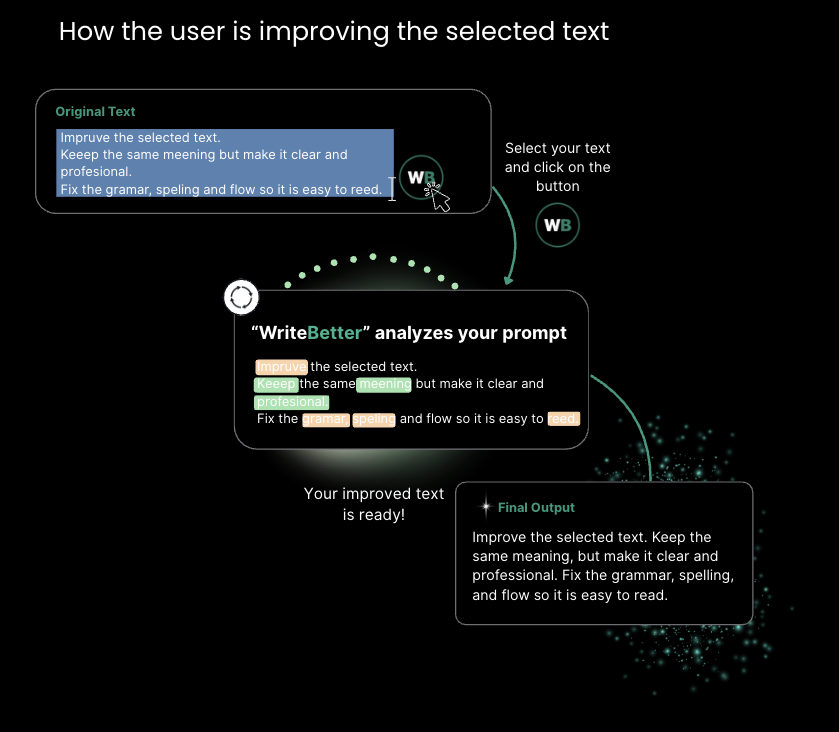
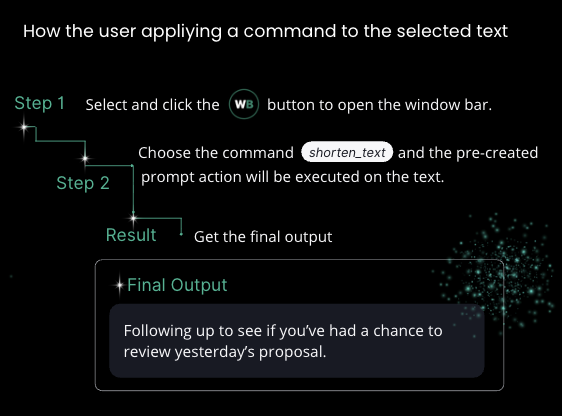
Applying Commands to Selected Text
The commands are text-processing actions that allow users to change selected text in the way they desire.
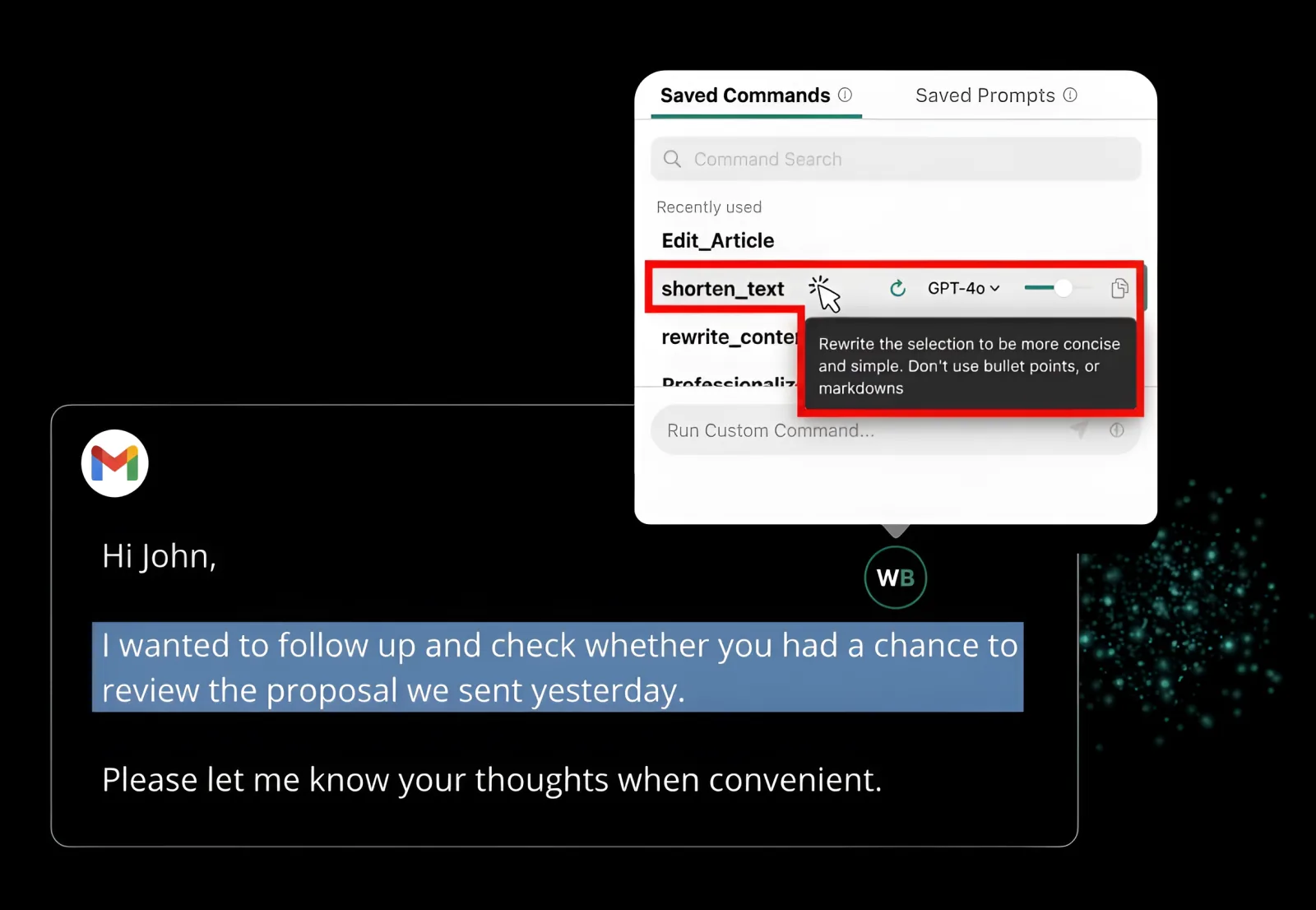
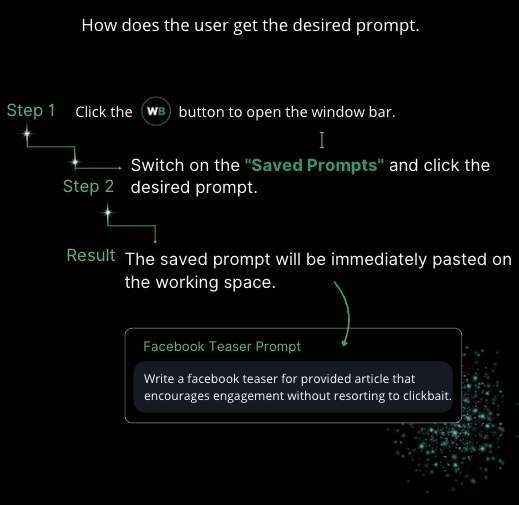
Getting Desired Prompts from Prompt Library
A centralized “Prompt Library” for creating, managing, and reusing your most effective prompts, streamlining your workflow.
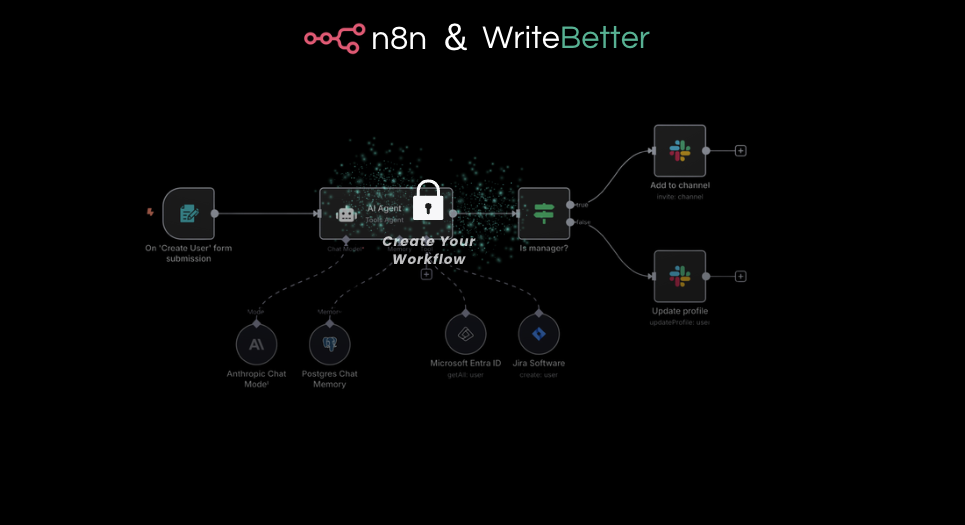
Agentic Workflow Integration
By connecting with n8n, WriteBetter can trigger advanced automated AI agents that use user-specific knowledge through simple command execution directly on incoming messages.
Your calls, written down as they happen
RTVT
Real-Time Voice Transcript & Translation · by Sven Badalyan
A live transcript that floats above every app, and an AI clean-up when the call ends.
RTVT listens to your meeting audio, tells the voices apart, writes every line down with the speaker’s name, avatar and timestamp, and saves each conversation to a folder on your Mac.
Free · Signed & notarized by Apple Developer ID
To use it, you need an access token — request yours from Sven
Thanks for joining. Shall we start with the export?
Yes. We need it running on the server by Friday.
That works. I will send the draft tomorrow morning.
Could the report also be in German?
Sure. We can generate both languages from the same data.
How it works
From raw speech to a clean transcript
The live window shows what it hears in real time. AI Clean then removes filler words, fixes punctuation and casing, and marks the parts it couldn't hear clearly instead of guessing.
- so uh we we need the export running on the server by friday right
- and the the client wants the report in german too
- [gap: recognition error]
- yeah i can send the draft um tomorrow morning
- So we need the export running on the server by Friday, right?
- And the client wants the report in German too.
- [gap: recognition error]
- Yeah, I can send the draft tomorrow morning.
Built for client calls
The options in RTVT's settings, one line each.
Floats above all apps
Keep the transcript on top of Zoom, Teams or your browser while you talk.
Speaker names & avatars
RTVT tells voices apart and labels every line with the speaker’s name and avatar, so you always see who said what.
Tag the customer
RTVT asks which customer the call is with, so every transcript is filed under the right client.
Language coach
Get feedback on your own phrasing while you speak a second language.
Adjustable real-time window
Set how many seconds of audio RTVT waits for before it writes a line. Shorter is faster, longer is more accurate.
Access token from Sven
RTVT is free to download and use. Request your access token from Sven, then add it in Settings under License & Keys.
Your transcripts stay on your Mac
You choose the folder
Every session is saved to the folder you pick in Settings.
Search, copy, export
Find a past call, copy the transcript or share it in one click.
Bring earlier sessions
Import transcripts from an earlier RTVT folder.
Stop taking notes. Start listening.
RTVT and WriteBetter work side by side: transcribe the call, then turn it into the follow-up.
Free · Signed & notarized by Apple Developer ID
To use it, you need an access token — request yours from Sven
CONTACT
Schedule Your AI Strategy Assessment
If you are facing a high-stakes AI problem and need a partner who combines elite expertise with speed and collaboration, let's connect. We can help you de-risk your project, empower your team, and deliver the breakthrough you need.
Location
Berlin, Germany
Call Us
+49 162 7344423
Mail Us
contact@svenbadalyan.com
Sven Badalyan
We respect your privacy
We use cookies to operate this website, improve usability, personalize experience, and improve our marketing. Your privacy is important to us, and we will never sell you data. Privacy Policy